 Shipping Help Center
What Is Uber Direct?
Uber Direct is a local delivery service for eligible same-day and scheduled shipments in Canada and the United States. The maximum delivery distance is generally 25 km in Canada and 20 miles in the U.S. The available distance can be shorter depending on driver availability, store hours, bridges, toll roads, or borders.
How do I schedule a pickup?
- Enter your pickup and delivery addresses and review the available courier quotes.
- Select Uber Direct if it appears.
- At the Pickup / Drop-Off step, choose an immediate or future pickup if available.
- Review the details and complete your shipment. Have the package sealed and ready before the driver arrives. For immediate pickups, you may see an estimated driver arrival time.

Depending on the location and shipment, options may include seven-day service, signature or adult signature, recipient text notifications, driver tipping, and delivery for eligible connected ecommerce stores. If a tip is available, you can add it during setup. It will be collected with the shipment payment.

Why isn’t Uber Direct showing in my quotes?
The addresses may be too far apart or outside the service area. The package details or selected time may also affect availability.
What can I send?
Use a securely packed and sealed parcel that fits comfortably in the trunk of a midsize car and meets the service’s size and weight requirements. Restricted items include people or animals, illegal or stolen goods, firearms and ammunition, cannabis, certain medications or supplements, cash and gift cards, tobacco and recreational drugs, hazardous goods, fragile items, certain regulated animal materials, and anything you aren’t authorized to send. Check the applicable service requirements before shipping. A driver may refuse a package based on its size, weight, packaging, contents, or suitability for transport. Refund eligibility depends on the circumstances.
Can I cancel or change delivery instructions?
You may be able to cancel before a driver is assigned. Once a driver has accepted and been dispatched, cancellation may be unavailable and the shipment may become non-refundable. Check the shipment status first.
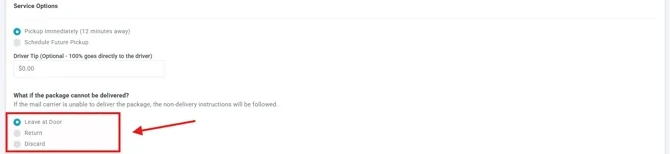
During setup, select an available instruction for failed delivery, such as leaving the parcel at the delivery location or returning it to the sender. Signature requirements can prevent unattended delivery. A return may incur additional charges.
How do I track a delivery?
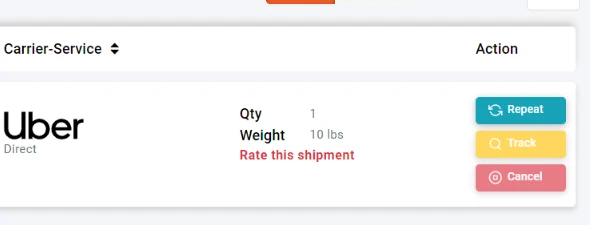
Open the shipment in History & Tracking for the latest details. The recipient may receive a text with a live tracking link, the driver’s name or contact details, and an estimated delivery time.
What if a parcel is lost or damaged?
Contact your shipping support team so they can review the delivery. If you added eligible shipment insurance, you may be able to file a claim under the applicable coverage terms.